
DSC Family Portal – FAQ
How to log in?
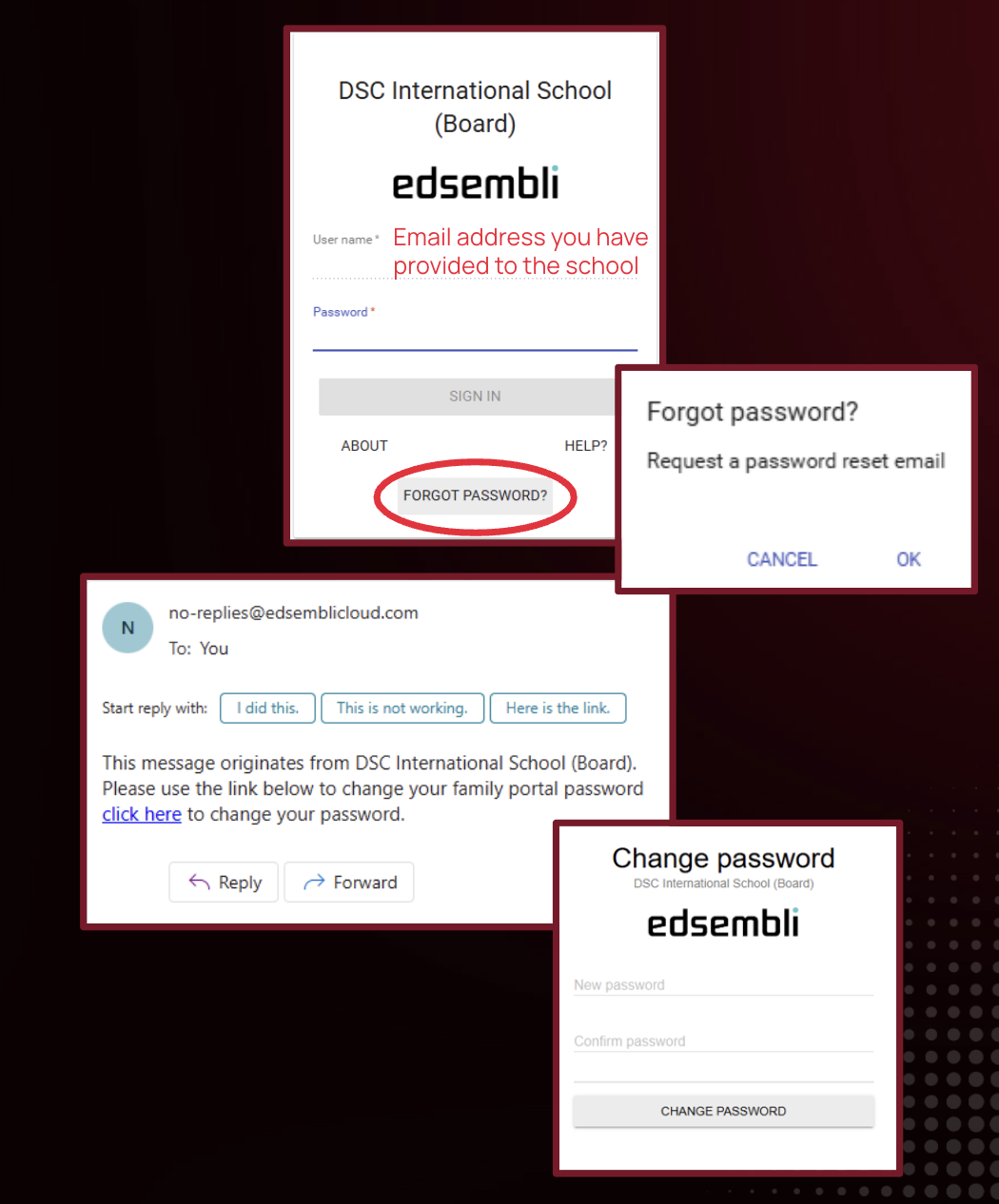
- Go to the Edsembli Family Portal
- For “Username,” type in the email address you have provided to the school previously
- Click “Forgot Password” and follow the instructions
- You will receive an email with a link to change your password
- Create a new password
- Log in with your new password
How to access my child’s information?
- On the left side, you will see all the children you have enrolled at DSC
- Click on their photo to view:
- Attendance
- Details you have provided to the school
- Grades
- Previous report cards (if available)
- Digital documents
- Forms, Fees, and Homework (coming next year)
How to read the notifications from the school?
- On the right side, you will see a notification feed
- All messages based on your child’s grade level will be displayed here
How can I find the PDF documents from the Parent Portal before?
- On the right side, you will see a notification feed
- The first message from the principal included a link to all important documents – Timetables, School Calendars, Student Handbook, etc.
How to find out upcoming events at school?
- In the middle, you will see a whole school calendar
- This calendar will be updated regularly and will include both Elementary and Secondary events
Who can I contact for support?
Please email ict@dsc.edu.hk for support if you have any questions